Species detection

Deer, wild boar, fox, humans, vehicles — tagged the moment they arrive based on continent-specific models.
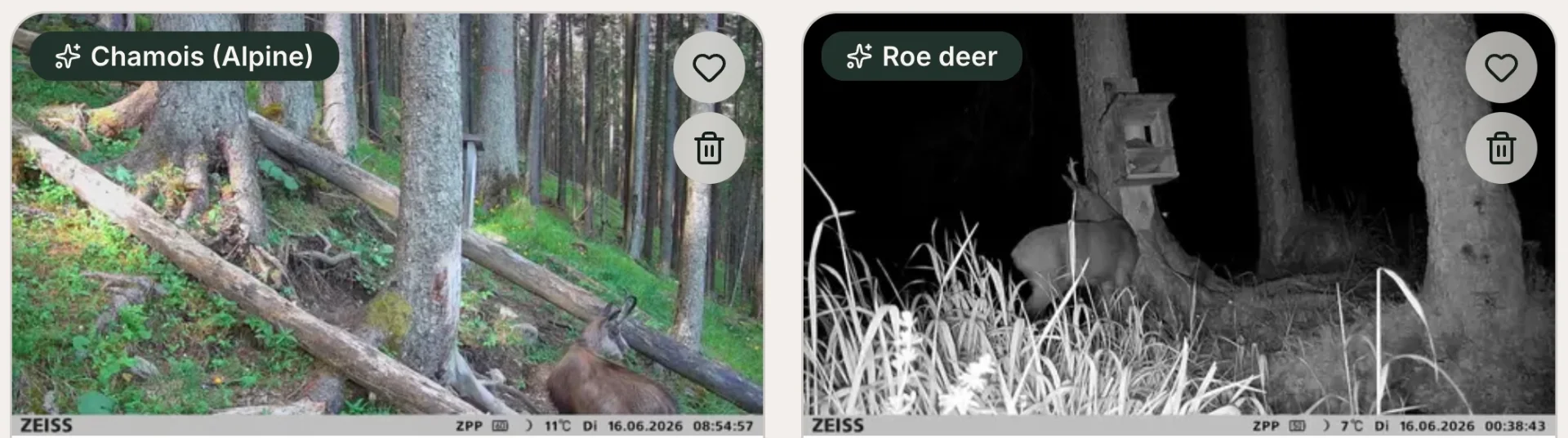
Species detection

Wildlife isn't the same on every continent, so TrailCamHub doesn't lean on a single "world" model. It runs two specialist recognition engines and picks the right one for each camera automatically — with no settings for you to manage.

Two models, chosen by location

  • Cameras in Europe use a model trained on European wildlife. It knows the continent's game — roe deer, red deer, wild boar, chamois, fox and more — and is fast and precise within that range.
  • Cameras anywhere else use a global model covering more than 2,000 species, from white-tailed deer and elk to kangaroos and peccaries.

For the global model, geofencing narrows the field further: the camera's country (or GPS position) rules out species that can't occur there, so a kangaroo is never proposed for a photo taken in Denmark.

Every photo, automatically

Recognition runs the moment an image arrives. Each animal is located, counted and identified by species — and overlapping detections of the same animal are merged, so two deer count as two, not three. People and vehicles are recognised separately.

One consistent result

Whichever engine runs, the output has the same shape — species, counts, confidence and on-image boxes — so you never have to think about which model did the work.

The payoff is accuracy where it matters: a regional specialist beats a generalist on home ground, while the global model means the product works on every continent without compromise.

Frequently asked questions

Our model is trained on millions of European and North American wildlife images. The AI that recognises species doesn't train itself further on your photos — but TrailCamHub does get smarter about each individual camera over time.

Expect >95% accuracy on common species like deer, wild boar and fox over time. It's built on proven, conservation-grade models, and on clear shots it's very good — but no automated recognition is perfect. Accuracy depends on the photo: distance, lighting, night shots, motion blur, partial bodies and unusual angles all make mistakes possible, and rarer or look-alike species are harder than common ones. Think of it as a fast, powerful first pass rather than a guarantee — uncertain cases are flagged as needs review so they surface instead of hiding, and you can always confirm or correct a result.

The AI that recognises species doesn't train itself on your photos — but TrailCamHub does get smarter about each individual camera over time.

It helps to separate two things:

  • The recognition models stay fixed. The models that detect animals and identify species are pre-trained and don't change based on your images. Your photos aren't used to retrain them — which keeps results predictable and means your captures stay yours.

  • Your cameras get cleaner over time. A trail camera sits in one fixed spot, so the same tree stump, root, rock or clump of grass can trigger it again and again — and the AI sometimes mistakes a static object like that for an animal, usually with low confidence. TrailCamHub watches for exactly this pattern: when the same area of a camera's frame keeps producing a near-identical, low-confidence detection across many photos over a longer period, it concludes that spot is a false alarm and stops flagging it as wildlife. So the longer a camera runs in one position, the fewer of these phantom detections you'll see.

This kind of learning is per camera and only targets recurring false alarms. It doesn't change which species the AI can recognise, and it's designed not to hide a real animal that happens to use the same spot — animals vary in position from photo to photo and usually score higher confidence, so they aren't treated as a static object.

gohst_zone.jpg

Using the detection API?

This false-alarm filtering is a feature of the TrailCamHub app, applied after detection on top of the raw result — it relies on each camera's photo history to spot recurring static objects. The public detection API works image by image and returns the raw detection result for the single image you send; it does not apply phantom-zone suppression. If you need that behaviour in your own integration, you'd build comparable logic on your side, or use the app, where it happens automatically.

As always, the AI is a fast first pass rather than a guarantee, and you stay in control: you can correct any result yourself.

Every photo and video runs through a multi-step pipeline rather than a single black-box model. Each step uses a model built and proven specifically for wildlife camera-trap imagery, and the steps build on one another:

1. Detection — find the animals.

First we run MegaDetector, the standard open-source camera-trap detector created by Microsoft's AI-for-Earth program and used widely across wildlife research. It locates every animal, person and vehicle in the frame and draws a box around each — but it doesn't yet say which species. We drop low-confidence boxes and merge overlapping ones, so the same animal is never counted twice. If no animal is found, the photo is flagged as an empty/false trigger — that's how wind-in-the-grass shots get filtered out automatically.

2. Classification — identify the species.

Each detected animal is then passed to a species classifier, and which one we use depends on where your camera is:

  • In Europe — DeepFaune: a classifier from the French DeepFaune initiative, a CNRS-led collaboration of 50+ wildlife research and management partners, trained on a large European camera-trap dataset with an emphasis on the mammals common across Europe.

  • Worldwide — SpeciesNet: Google's open-source model (the one used in the Wildlife Insights platform). It pairs MegaDetector with an EfficientNet-V2 classifier trained on a very large global dataset covering 2,000+ species and higher-level groups.

3. Region tuning — narrow it to what actually lives where you hunt.

A worldwide classifier will occasionally propose a species that doesn't occur on your ground. We cut that down two ways:

  • Geofencing (worldwide): SpeciesNet uses your camera's country/region — and its coordinates where available — to restrict predictions to species that genuinely occur there, so a North-American look-alike won't be suggested for a Bavarian forest.

  • Your game-species list: in your settings you choose the species you expect on your ground. We don't retrain the models on your photos — instead we use your list to validate each result. Anything that falls outside your list isn't silently accepted or relabelled; it's kept and flagged for review, so you stay in control and can confirm or correct it. The more accurately your list and camera location reflect reality, the cleaner your results.

4. Antler check (optional, for the deer species you enable).

For the antlered species you turn on, a separate vision-language model takes a close-up of the animal's head and judges whether antlers are visible. It's deliberately conservative: only a clear "yes" marks the animal as a likely male, uncertain cases go to needs review, and a missing or hidden antler never implies "female" — does, cast antlers, a turned head, or a head cropped out of frame simply can't be judged. To give this step a fair chance, we expand the crop upward so the head is included even when the detector framed only the body.

5. Result.

Per photo you get: the species, how many animals, a box on the image showing what was found and where, an antler/sex hint where it applies, and any people or vehicles marked (which can be blurred or hidden for privacy). Videos work the same way — we sample frames across the clip and combine the findings.

A note on accuracy: These are excellent, conservation-grade models, but no automated recognition is perfect — light, distance, motion blur, partial bodies and odd angles all make mistakes possible. Treat the results as a fast, powerful first pass rather than a guarantee, and verify anything that matters. The needs review flag exists precisely so the uncertain cases surface instead of hiding.

There isn't one fixed list — what TrailCamHub can recognize depends on where your camera is, because we run the recognition model best suited to your region.

In Europe, recognition uses DeepFaune, which covers roughly two dozen of the most common European species and groups — the wildlife you'd expect on European ground, such as red deer, roe deer, wild boar, fox, chamois, ibex, mouflon, hare, badger and lynx, plus broad groups like "bird." DeepFaune is actively developed, so its coverage keeps growing.

Worldwide, recognition uses SpeciesNet (Google's open model), which covers 2,000+ species and higher-level groups across the globe. Outside Europe this is what identifies your animals, narrowed to your camera's location so only species that actually occur there are suggested.

On top of the animals, every photo is also checked for people and vehicles, which can be blurred or hidden for privacy.

Two things shape the exact list you'll see in practice. Your region and camera location decide which model and which geographic species pool apply, and your game-species list in settings lets you choose the species you actually expect on your ground — anything outside it is flagged for review rather than silently accepted.

  • Where to find the full lists

  • The simplest place is inside your account: your species settings show the full list available for your region, and you tick the ones you want tracked.

  • For the complete underlying model lists:

    • DeepFaune (Europe): deepfaune.cnrs.fr

    • SpeciesNet (worldwide): the full label list of 2,000+ categories is published in the model card on Kaggle (kaggle.com/models/google/speciesnet) and in Google's project on GitHub (github.com/google/cameratrapai).

If a species you hunt isn't being recognized well, let us know — we map species to the models on our side and can often improve coverage for your region.

Night shots, motion blur, and animals at the frame's edge or partly hidden can all throw off detection. Tuning your species list and reviewing flagged photos helps, and you can always correct a result.

For the deer species you enable, a separate vision model takes a close-up of the animal's head and judges whether antlers are visible. Because trail cameras often frame only the body, we expand that crop upward so the head is included. It's deliberately conservative: only a clear result flags the animal as a likely buck (male), while unsure cases go to needs review. Importantly, a missing or hidden antler is never read as "female" — a doe, cast antlers, or a turned or cut-off head simply can't be judged. Treat it as a helpful hint to confirm, not a guarantee.