
Intelligente Gruppierung
Serienaufnahmen desselben Tieres werden zu einem übersichtlichen Ereignis zusammengefasst.
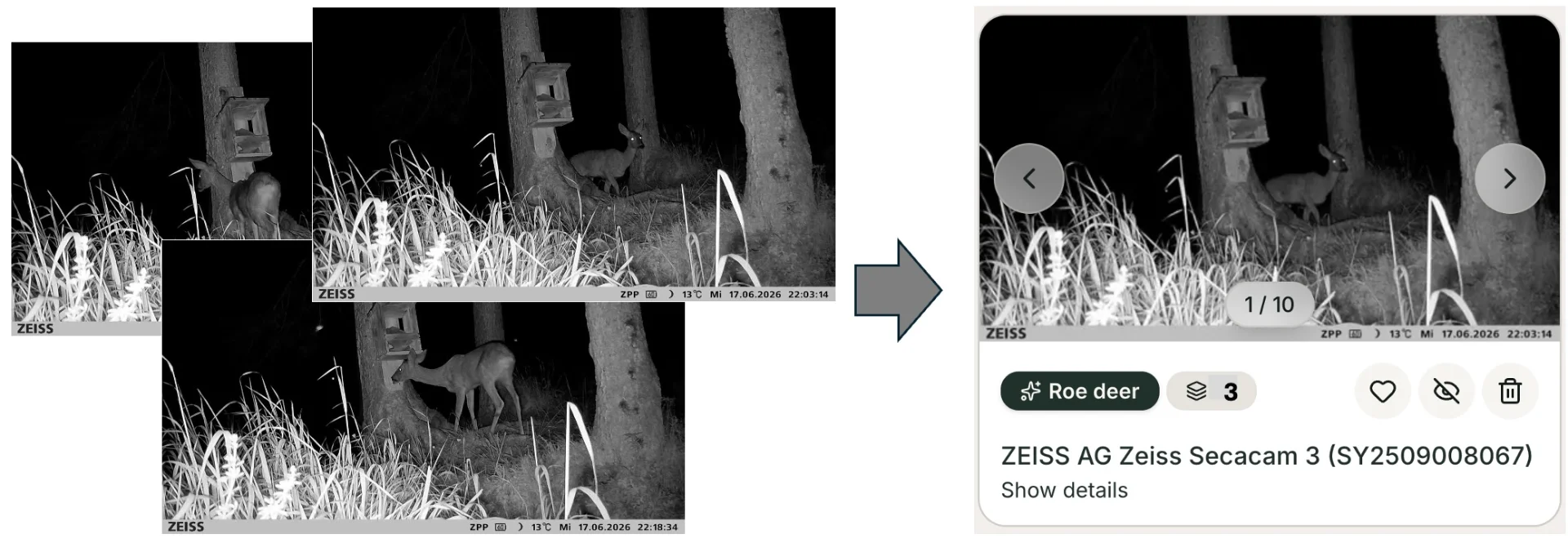
Ein einzelnes Tier, das an einer Kamera vorbeigehen, löst selten nur ein Foto aus — es löst eine Serie von zehn oder zwanzig Fotos aus, im Sekundentakt. Bild für Bild betrachtet, ist das eine Flut. Intelligente Gruppierung reduziert jede Serie zu einem einzelnen, übersichtlichen Ereignis. Diese gruppierte Zeitleiste — Serienansicht — ist die Standard-Anzeigeweise deiner Mediathek in TrailCamHub.
Wie Bilder zu einem Ereignis werden
Fotos, die zeitnah nacheinander auf derselben Kamera aufgenommen wurden, werden als ein Auslöser erkannt und automatisch gruppiert. Statt zwanzig nahezu identischer Vorschaubilder siehst du ein Ereignis mit den besten Bildern darin.
Kohärenz durch Erkennung
Weil jedes Bild bereits analysiert wurde, kommt das Ereignis beschriftet an: welche Art ist vorhanden, wie viele Tiere, ob eine Person oder ein Fahrzeug beteiligt war. Eine Serie eines äsenden Rehs wird zu "Reh — 1 Tier", nicht zu einer Bilderwand, die du interpretieren musst. Wenn sich die Bilder bei Art und Anzahl einig sind, wird das Ereignis mit Sicherheit angezeigt; wenn sie nicht übereinstimmen, wird das zur schnellen Überprüfung hervorgehoben.
Warum es wichtig ist
Wildkamerasammlungen wachsen genau wegen dieser Serien an. Sie zu gruppieren ist der Unterschied zwischen einstündiges Scrollen und schnelles Überfliegen einer sauberen Zeitleiste von Besuchen. Jedes Ereignis wird zu einer Entscheidung — behalten, markieren, teilen oder verwerfen — statt zwanzig.
Bevorzugst du die Originalbilder?
Serienansicht ist die Standard, aber du bist nicht daran gebunden. Schalte jederzeit auf Bildansicht um, um die Gruppierung auszuschalten und jedes einzelne Foto nacheinander zu durchsuchen — nichts wird gelöscht oder verändert, du siehst einfach die unsortierten Bilder. Wechsel zwischen den beiden, wenn es für die Aufgabe passt.
Eine Anmerkung zur Funktionsweise: Gruppierung basiert auf Aufnahmezeit und Kamera, angereichert durch die KI-Arten und Zählungen. Sie organisiert einen Besuch in einem Eintrag, anstatt das spezifische Individuum über Bilder hinweg visuell erneut zu identifizieren — aber das Ergebnis ist gleich: Deine Mediathek wird zu Ereignissen, nicht zu Rohbildern.